What is a Website UX Audit, and What Should It Uncover?

A website can look great and still be surprisingly difficult to use.

The navigation is clean. The pages load. The design feels modern. The forms work. Nothing appears obviously broken. Yet visitors aren’t taking the actions you want them to take.

That’s where UX problems can be easy to miss. They aren’t always broken links, obvious design flaws, or technical errors. Sometimes they’re small moments of confusion or unnecessary effort that create website friction that gets in the way of conversions. They make it just a little harder for someone to find information, make a decision, or take the next step.

And those small moments can have a measurable impact.

Baymard Institute’s 2025 research found that 64% of desktop ecommerce sites and 63% of mobile sites had checkout experiences rated “mediocre” or worse. Even more interesting, after years of usability testing, Baymard has found that checkout design and flow can be the sole reason users abandon a purchase.

That research focuses on ecommerce, but the underlying lesson applies to almost any website. A potential customer might be ready to request a consultation, schedule an appointment, submit an application, download a resource, or contact your sales team. If the experience creates confusion or asks for too much effort, some of those people simply won’t finish.

Consider a visitor who lands on a service page looking for a solution to a specific problem. The page looks professional, but they can’t quickly determine whether the service is right for them. They scroll for proof, encounter a vague “Get Started” CTA, and eventually reach a form asking for ten pieces of information.

Nothing on the website is technically broken.

But the experience is.

That’s the kind of problem a website UX audit should uncover.

A good UX audit isn’t a critique of whether your website looks modern enough. It’s a structured evaluation of how effectively your website helps people accomplish what they came there to do and where the experience may be getting in their way.

More importantly, it should give you something you can act on.

Because the goal isn’t to walk away with a long list of things someone doesn’t like about your website. It’s to objectively identify the barriers most likely to affect your customers and your business, understand why they matter, and determine which ones are worth fixing first.

If you want to put these ideas into practice right away, we’ve included a simple 7-Question UX Audit Checklist you can use to evaluate one of your own website journeys. You can jump directly to the checklist or keep reading to understand what a strong UX audit should uncover and how to prioritize what you find.

Quick Takeaways

A useful UX audit should help you determine whether visitors can find what they need, understand what to do next, complete important tasks without unnecessary effort, get the information they need to make a decision, and have an equally strong experience on mobile.

It should also connect those observations to evidence so you can prioritize the issues most likely to affect customers and business results.

Short on time? Start with the 7-Question UX Audit Checklist 

A Useful UX Audit Should Answer Five Questions

At its core, a website UX audit should help you understand:

  • Can people find what they’re looking for?
  • Is it clear what they should do next?
  • Are you asking users to work too hard?
  • Do they have enough information to make a decision?
  • Does the experience work as well on mobile as it should?

These questions provide a practical starting point for evaluating where your website may be helping customers move forward and where it may be getting in their way.

A UX Audit Isn't a Design Critique

When people hear “UX audit,” it’s easy to picture a designer reviewing a website and pointing out everything they would change.

The navigation should be different. The buttons should be larger. The page needs more white space. The homepage feels dated.

Those observations may be valid, but they aren’t enough to make a UX audit useful. Good UX goes well beyond aesthetics, and it isn’t determined by personal preference. A website doesn’t need to win a design award to work well for the people using it.

A UX audit should start with a different question: Can people accomplish what they came here to do without unnecessary confusion, effort, or hesitation?

That changes how you evaluate the website.

Imagine two companies with nearly identical contact forms. On the first website, the form follows a clear explanation of the service, customer results, and what happens after submission. On the second, visitors are simply told to “Contact Us.”

The form itself isn’t the UX problem. The experience leading up to it might be.

The same principle applies throughout a website. A navigation menu can function perfectly but use terminology customers don’t understand. A call to action can be easy to see but leave visitors unsure about what happens after they click. A service page can contain all the right information but organize it in a way that forces users to hunt for the answers they need.

That’s why a useful UX audit looks beyond individual design elements and evaluates them in the context of the customer’s goal.

It should consider how easily visitors can find information, understand their options, build confidence, and move from one step to the next. It should also look for places where the website is asking users to think harder, click more, search longer, or provide more information than necessary.

And importantly, those findings shouldn’t be based solely on someone’s opinion. Analytics, user behavior, usability principles, customer feedback, and business goals can all provide evidence that helps separate “I would design this differently” from “this may be preventing users from taking action.”

Once you make that distinction, the next question becomes much more useful: What should you be looking for?

What Should a Website UX Audit Evaluate?

Once you stop looking at a website as a collection of design elements, a UX audit becomes much more practical. You’re no longer asking whether you like the website. You’re looking for places where the experience makes it harder for visitors to accomplish their goals.

There are hundreds of things you could evaluate, but most UX problems can be traced back to a handful of fundamental questions.

1. Can People Find What They’re Looking For?

Visitors don’t arrive on your website hoping to explore your organizational structure. They usually arrive with a question or a goal.

They want to understand a service, compare options, find pricing, see examples of your work, schedule an appointment, or determine whether your company can solve their problem. Your website’s job is to help them get there.

The challenge is that businesses often organize websites around how they think about themselves rather than how customers think about their needs.

Imagine a healthcare organization that offers treatment for chronic back pain, but its navigation organizes services by internal department names or clinical terminology. The information a patient needs may be there, but finding it requires knowing how the organization categorizes that treatment.

The same thing happens on B2B websites. A prospective customer may be searching for help improving website conversions while the company’s navigation asks them to choose between “Digital Experience,” “Optimization,” and “Growth Strategy.” Those terms may make perfect sense internally. To a new visitor, the distinction may be far less obvious.

A UX audit should look for those disconnects between how the organization labels information and how customers look for it.

Test it yourself: Give someone who isn’t closely involved with your website a simple task, such as “Find out whether this company can help improve an ecommerce checkout experience” or “Find out how to schedule a consultation.” Don’t tell them where to click.

Watch where they hesitate, which navigation labels they try first, whether they backtrack, and how long it takes them to find what they’re looking for.

You don’t need sophisticated usability software to learn something useful from the exercise. Sometimes watching one person confidently click the wrong navigation item tells you more than another hour spent debating menu labels.

And finding the right information is only the first challenge. Once visitors get there, the website has another job: making the next step clear.

If those answers require a conversation with sales, your website may be asking buyers to make a decision before they’ve built enough confidence to do so.

The goal isn’t to answer every possible question on every page. It’s to anticipate the questions that matter most and answer them before uncertainty sends buyers looking elsewhere.

2. Is It Clear What Visitors Should Do Next?

Finding the right page doesn’t mean a visitor will know what to do once they get there.

Most websites have calls to action. In fact, many have plenty of them. The problem is that more choices don’t always make the next step clearer.

Imagine a prospective customer reaches a service page and sees several options:

“Learn More.”
“Get Started.”
“Contact Us.”
“Request Information.”
“Talk to an Expert.”

Each sounds reasonable. But are they different actions? Do they all lead to the same place? What happens after someone clicks “Get Started”?

The business sees five opportunities to convert.

The visitor may see five decisions they have to make.

A UX audit should evaluate more than whether calls to action are visible. It should look at whether the next logical step is clear based on where the visitor is in their journey.

Someone reading an introductory article may not be ready to schedule a sales call. A visitor reviewing a detailed service page may be. Someone comparing several solutions might need a case study, pricing information, or an example before they’re comfortable moving forward. Creating a customer journey that converts means giving visitors a logical next step based on where they are in that decision process.

That means the strongest call to action isn’t always the one with the brightest button or most aggressive language. It’s the one that makes sense at that moment.

The language matters, too. Generic CTAs such as “Submit” or “Get Started” don’t tell visitors much about the outcome. More specific language like “Request Your Website Audit,” “Schedule a 30-Minute Consultation,” or “See Customer Results” gives them a better idea of what comes next.

A quick way to check: Choose five of your most important pages and answer one question for each:

What is the most important thing we want someone to do after visiting this page?

Then look at the page without relying on your knowledge of the website. Is that action obvious? Does the CTA explain what the visitor is getting? Are other actions competing with it?

If you have trouble identifying the primary action, there’s a good chance your visitors do too.

Of course, knowing what to do next doesn’t mean someone will do it. The next place a UX audit should look is at how much work you’re asking them to do.

3. Are You Asking Visitors to Work Too Hard?

Every extra step you ask a visitor to take creates another opportunity for them to decide the effort isn’t worth it.

Sometimes that effort is obvious: a long form, mandatory account creation, or a scheduling process spread across several screens. Other times it’s less visible. Visitors have to reread unclear copy, hunt for pricing, provide the same information twice, or click through multiple pages for a simple answer.

Each interaction may seem minor on its own. Together, they create friction.

Research from Baymard Institute provides a good example of how that friction can affect behavior. In its ongoing research into cart abandonment, 17% of U.S. online shoppers surveyed said they had abandoned an order because the checkout process was too long or complicated.

The lesson extends well beyond ecommerce. People are constantly making an informal calculation when they use a website: Is what I’m getting worth the effort required to get it?

Consider a company offering a free consultation. A prospective customer has already read the service page, reviewed a case study, and decided they’re interested. They click the CTA and encounter a form asking for their name, company, email, phone number, job title, company size, industry, annual revenue, budget, timeline, and a description of their project.

From the company’s perspective, every field has a purpose. The information helps qualify and route the lead.

From the visitor’s perspective, they were trying to start a conversation and suddenly received homework.

That doesn’t mean every form should have three fields or every process should be reduced to one click. Sometimes additional information is necessary. The UX question is whether the effort you’re requiring is necessary at that particular point in the journey.

Could some information be collected later? Could two steps be combined? Could information buried on another page be brought into the experience where the decision is being made?

Put it to the test: Complete one of your most important conversion paths on your phone. Count the steps, fields, decisions, and pieces of information you have to find.

Then ask:

Does the visitor need to do this right now for us to help them move forward?

If the answer is no, you’ve found something worth investigating.

Reducing effort, however, is only part of creating a strong experience. Visitors also need enough information to feel confident that taking the next step is the right decision.

4. Do Visitors Have Enough Information to Make a Decision?

Not every UX problem is caused by something difficult to use. Sometimes the website works perfectly, but visitors still don’t have enough information to feel comfortable moving forward.

This is where usability and conversion optimization begin to overlap.

Imagine someone evaluating two companies for the same service. The first website explains what the company does and provides a prominent “Contact Us” button. The second explains the service, identifies who it’s best suited for, provides examples of results, answers common questions, and tells visitors what to expect after they reach out.

Both websites may be equally easy to navigate.

But one makes the decision easier.

Visitors bring questions, concerns, and uncertainty with them. How much does this cost? Will this work for a company like mine? How long will it take? Can I trust this company? What happens after I fill out the form? What am I committing to?

When important questions go unanswered, visitors have to decide whether they’re willing to take the next step without that information. Some will. Others will leave and keep researching somewhere else.

A UX audit should look for these information gaps, especially near important conversion points. That might include missing pricing or pricing context, weak social proof, vague service descriptions, buried FAQs, a lack of examples, unclear processes, or calls to action that don’t explain what happens next.

The right information will vary by business and by audience. Someone buying a $25 product needs a different level of reassurance than someone evaluating a six-figure technology investment. The higher the perceived risk or commitment, the more questions a visitor is likely to need answered before they’re ready to move forward.

Check your own experience: Go to one of your highest-value conversion pages and imagine you’re a prospective customer who knows nothing beyond what’s on that page. Before clicking the primary CTA, write down the questions you would want answered.

Then see how many the page answers.

Better yet, ask your sales or customer service team which questions prospects routinely ask before making a decision. If the same questions come up repeatedly, your website may need to answer them earlier.

Your website doesn’t need to answer every possible question. It does need to answer the questions that are most likely to stand between interest and action.

And even when you’ve created a clear, informative path, there’s one more place where seemingly good experiences often fall apart: the small screen.

5. Does the Experience Work as Well on Mobile as You Think It Does?

Most organizations know their websites need to be mobile-friendly. Responsive design has been standard practice for years.

But a website fitting on a smaller screen isn’t the same thing as creating a good mobile experience.

A page can pass every technical test and still be frustrating to use on a phone. Navigation that feels simple on desktop can become cumbersome behind a menu. Forms can feel endless when you’re tapping through fields, and important information can get pushed so far down the page that users never reach it.

Even the context is different. Desktop visitors may be sitting at a desk with time to compare options. Mobile visitors could be standing in a store, sitting in a waiting room, commuting, or trying to complete a task between everything else happening in their day.

That makes efficiency especially important.

Consider a prospective customer who finds your company through a Google search on their phone. They land on a service page, decide they want to schedule a consultation, and tap the CTA. The scheduling tool opens in a new window. They choose a date, select a time, enter their contact information, answer several required questions, and then discover they need information they don’t have readily available.

They decide they’ll finish it later.

Maybe they do. Maybe they don’t.

Nothing technically failed. The website was responsive. The scheduling tool worked. Every field loaded correctly.

But the mobile journey still failed to make the desired action easy.

A UX audit should therefore evaluate mobile experiences as complete journeys, not just individual pages. If scheduling an appointment, requesting a quote, completing a purchase, or submitting a lead form is important to the business, someone should complete that entire process on a phone.

One final test: Put away your laptop and complete the most valuable action on your website from beginning to end on your phone.

Don’t just check whether everything displays correctly. Pay attention to how easy it is to navigate, read, tap, type, move backward, and complete the task.

Most importantly, ask yourself:

Would I have finished this if I weren’t testing my own website?

That’s a very different question from “Is our website mobile responsive?“

And it points to an important distinction in UX auditing. Finding potential problems is only the beginning. The next challenge is determining whether those problems are supported by evidence and which ones deserve your attention first.

Your Analytics Can Tell You Where. UX Helps Explain Why.

A UX audit shouldn’t rely on guesswork, and neither should your optimization strategy.

Website analytics can provide valuable clues about where website visitors are leaving or dropping out of the journey. A landing page converts much worse on mobile than desktop. Visitors consistently abandon a multi-step form at the same point. A high-traffic service page generates surprisingly few next-page visits.

Those numbers tell you something is happening.

They don’t necessarily tell you why.

A low conversion rate could be caused by a confusing CTA, mismatched traffic, missing information, a cumbersome form, poor mobile usability, or an offer that simply isn’t compelling enough. Redesigning the page based on the metric alone risks solving the wrong problem.

That’s where the UX investigation begins.

Analytics can help identify where to look. Behavioral tools such as session recordings and heatmaps can provide additional clues about what users are doing. Customer feedback, sales conversations, usability testing, and a structured review of the experience can then help build a stronger explanation for why they’re doing it.

For example, suppose analytics show that mobile visitors are abandoning a lead form at twice the rate of desktop visitors. Rather than immediately shortening the form, you might complete the mobile experience yourself and discover that an address field doesn’t support autofill, the keyboard covers the next button, or an error message doesn’t explain how to correct an invalid entry.

Now you don’t just have a metric.

You have a hypothesis you can investigate and test.

That’s an important outcome of a good UX audit. The goal isn’t to produce the longest possible list of things that could be changed. It’s to combine evidence with observation so you can identify the changes most likely to improve the experience and prioritize what to do next.

What Should You Get From a UX Audit?

Finding UX problems is useful. Knowing what to do about them is much more valuable.

A UX audit can easily become a long list of observations. The navigation could be clearer. The form feels too long. The mobile experience needs attention. The CTA might be stronger. The page could use more social proof.

You could walk away with 40 recommendations and still have no idea where to start.

A useful UX audit should help you move from observation to action. For every significant issue it identifies, you should understand five things:

Problem → Evidence → Potential Impact → Recommendation → Priority

Consider a service page that receives significant mobile traffic but generates very few consultation requests. An audit might document the finding like this:

Problem: The primary call to action appears late in the mobile experience, after several long sections of content.

Evidence: Mobile visitors represent 68% of page traffic, but few reach the section containing the primary CTA. A review of the mobile experience also shows there is no clear conversion opportunity earlier on the page.

Potential Impact: High. The majority of visitors are using the version of the page where the primary conversion opportunity is hardest to reach.

Recommendation: Introduce a relevant CTA earlier in the mobile experience and consider testing a persistent CTA that remains accessible as users scroll.

Priority: High.

Now compare that with a recommendation that simply says, “Move the CTA higher on the page.”

The proposed change may be identical, but the first version tells you why you’re considering it, what evidence supports it, and why it deserves attention.

That context matters because not every UX issue is equally important.

A slightly confusing label on a page that receives 100 visits a month probably shouldn’t compete for resources with a cumbersome form used by 10,000 prospective customers. Likewise, an issue affecting the final step before conversion may deserve more attention than a minor inconvenience on a low-priority page.

This is where prioritization becomes one of the most valuable parts of the audit.

One simple approach is to evaluate findings based on three questions:

  • How many users could this affect?
  • How important is the affected action to the business?
  • How much evidence do we have that this is creating a problem?

You don’t need a complicated scoring model. The goal is to separate “we could improve this” from “we should investigate this next.”

There’s another reason that distinction matters. A UX audit doesn’t always tell you exactly what the solution should be.

If users aren’t completing a form, for example, the answer might be fewer fields. It could also be clearer expectations before the form, stronger trust signals, better mobile functionality, different CTA language, or a completely different conversion path.

The audit identifies the opportunity and builds the case for addressing it. From there, the recommendation might be an immediate usability fix, additional research, or an A/B test that helps determine which approach performs better. If testing is the right next step, a structured approach to CRO hypothesis generation can help turn those observations into clear, testable ideas.

That’s why the best UX audits don’t end with a redesigned page.

They end with a prioritized roadmap for learning and improvement.

And you don’t need a formal audit to start thinking this way.

A 7-Question UX Audit Checklist

You don’t need specialized software or a weeks-long project to start identifying potential UX problems. Choose one important customer journey on your website and experience it from beginning to end.

As you go, ask:

  • Can I quickly tell what this company does and who it helps?
  • Can I easily find the information I came here for?
  • Is the next step obvious?
  • Am I being asked to do anything that feels unnecessary?
  • Do I have enough information to feel comfortable taking action?
  • Can I complete the entire journey comfortably on my phone?
  • Where did I hesitate?

When you’re finished, don’t immediately redesign everything you noticed. Write down the three moments that created the most confusion, effort, or uncertainty and look for evidence. Check your analytics, review form completion rates, compare mobile and desktop performance, talk to sales or customer service, or review behavioral data if it’s available.

You may confirm your suspicion. You may discover the problem is somewhere else entirely. Either outcome is useful.

That’s the mindset behind a strong UX audit. You’re not hunting for things to change simply because they could be different. You’re looking for evidence that something in the experience may be standing between a visitor and what they came to accomplish.

And sometimes, the most valuable discovery is that the website isn’t broken at all. It just needs to get out of the user’s way.

Final Thoughts

A website doesn’t have to be broken to be getting in the way.

It can load quickly, look polished, work on mobile, and contain all the right information while still making visitors work harder than they should to find answers, make decisions, or take the next step.

That’s what makes UX problems so easy to overlook. When everything technically works, it’s tempting to assume the experience works too.

A UX audit challenges that assumption. It looks at the website from the user’s perspective and identifies where confusion, effort, or uncertainty may be affecting the journey. More importantly, it connects those observations to evidence so teams can focus on the opportunities most likely to make a difference.

You don’t need to fix everything at once. Start with one important journey. Identify where people may be struggling, look for evidence, and prioritize the changes or experiments with the greatest potential impact.

Because improving UX isn’t about making your website prettier. It’s about making it easier for people to accomplish what they came there to do.

Put Your UX Audit to Work

Start with one of your website’s most important customer journeys. Use the 7-Question UX Audit Checklist to walk through the experience from beginning to end, then identify the three moments that create the most confusion, effort, or uncertainty.

From there, look for evidence. Are visitors abandoning a form? Are mobile users converting at a lower rate? Are people reaching an important CTA? The goal isn’t to find everything you could change. It’s to identify the problems most worth investigating.

If you’re not sure what the evidence is telling you, or you want help turning those findings into a prioritized plan, Anala can help.

Our UX and CRO services help organizations uncover experience and conversion barriers, prioritize the opportunities with the greatest potential impact, and turn those insights into practical improvements and experiments.

Ready to take a closer look at your website? Talk to Anala about your UX and conversion opportunities.

10 Ecommerce Trends to Watch in 2027

Most trend lists describe the present tense and call it the future. This one starts from what the data already shows in 2026, states where each line goes next, and rates how confident that call is. Seven charts, twenty-nine unique sources, and a section translating all of it for small businesses — including the three trends you are allowed to ignore.

The 2027 board

1. The market is growing steadily. Almost nothing else is stable.

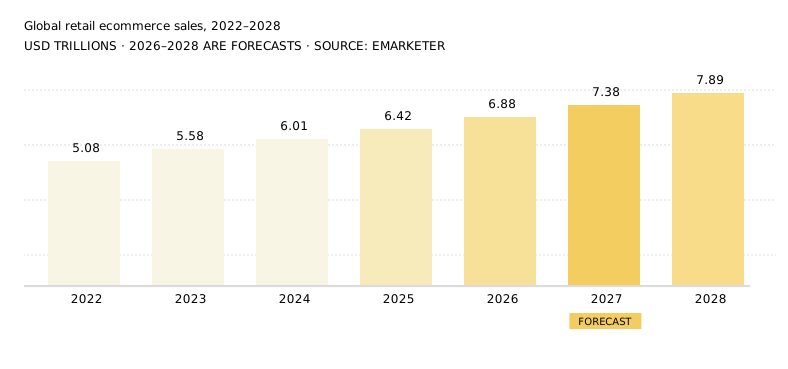
Start with the number everyone quotes. EMARKETER puts worldwide retail ecommerce at roughly $6.88 trillion in 2026 — about 21.1% of all retail spending — rising to approximately $7.38 trillion in 2027 and $7.89 trillion in 2028, when online reaches about 22.5% of total retail.

That is a boring, dependable line: single-digit growth, gently decelerating. It is also the least interesting fact in this article, because it tells you nothing about where the money moves inside the channel. The composition of that $7.38 trillion in 2027 will look meaningfully different from 2026’s — different discovery surfaces, different payment rails, different landed-cost math, different measurement. Every trend below is a claim about composition, not size.

Steady growth, decelerating rate. The channel adds roughly half a trillion dollars a year. Share of total retail climbs from 21.1% in 2026 to about 22.5% by 2028. EMARKETER February 2025 forecast, via Shopify and industry reporting.

2. Agentic commerce stops being a pilot and becomes plumbing

Call: By end of 2027, protocol support is a procurement checkbox, not a differentiator — while fully autonomous checkout stays a minority of agent-influenced revenue.
Watch: Share of orders where an agent touched discovery, not just checkout.
Confidence: High on infrastructure. Low on autonomous purchase volume.

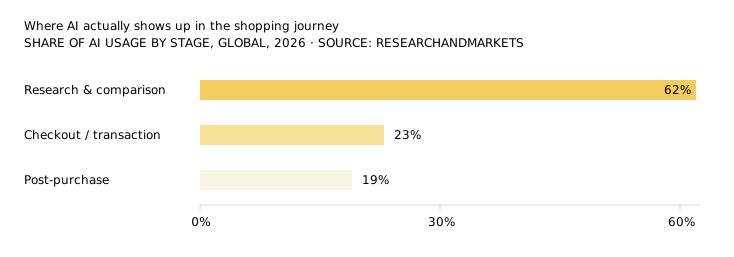
2026 was the year the rails got laid. Stripe and OpenAI’s Agentic Commerce Protocol shipped, Google launched the Universal Commerce Protocol at NRF in January 2026, Microsoft Copilot Checkout went live in the US, and Anthropic’s Model Context Protocol became the de facto way agents reach live inventory and pricing. Visa published a Trusted Agent Protocol; Stripe introduced shared payment tokens so an agent can pay without holding a card.

What did not happen is equally instructive. OpenAI moved away from its initial Instant Checkout approach inside ChatGPT, shifting toward product discovery and comparison while allowing merchants to use their own checkout experiences. Walmart reported in-chat purchases converting roughly three times worse than redirecting the shopper to its own site. Forrester’s mid-2026 read is blunt: the narrative assumes agent-led buying is already widespread, while actual consumer trust and adoption remain limited and unevenly distributed.

Agents are winning the top of the funnel long before they win the wallet. Planning for 2027 on the assumption that agents will buy is the wrong bet; planning on the assumption that they will shortlist is the right one.

The practical consequence is that the competitive battleground in 2027 is not autonomous checkout. It is whether your catalog is legible to a machine — structured, complete, real-time, and API-exposed. Product data has quietly become a distribution asset.

“Structured, accurate, real-time product data is now a trust signal.”

— commercetools, The agentic commerce radar: Spring 2026 update, 22 April 2026

The counterargument
Agentic commerce is currently a rounding error. EMARKETER forecasts AI-platform-driven sales at roughly $20.57 billion in 2026 — about 1.5% of US retail ecommerce, and nearly quadruple 2025. If you are a $3M store, protocol work in 2027 is an option contract on a channel, not a revenue plan. Price it accordingly.

What to do in 2027

  • Audit machine readability before you audit design. Every PDP should expose price, availability, variants, shipping terms, and return terms as structured data, not just as rendered text.
  • Stop blocking the crawlers you want. Check robots.txt and your WAF for blanket AI-agent blocks put in place in 2024–25.
  • Pick two protocols, not five. Support the ones your platform natively brokers rather than hand-rolling integrations.
  • Instrument agent traffic separately in analytics now, so you have a full year of baseline before you have to justify budget against it.

3. AI referral becomes the highest-intent channel you own least

Call: Through 2027, AI-referred sessions stay small in volume and disproportionate in value — and the gap between machine-readable sites and everyone else widens into a real revenue difference.
Watch: Revenue per visit from AI referrals vs. organic search, tracked monthly.
Confidence: High.

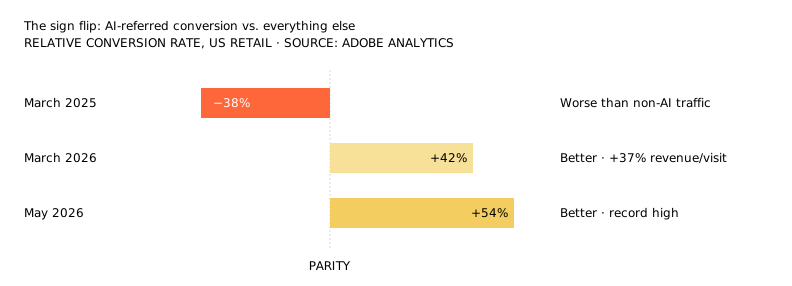
The single most striking data point of 2026 came from Adobe Analytics, drawn from more than a trillion visits to US retail sites. In March 2025, visitors arriving from AI assistants converted roughly 38% worse than everyone else. Twelve months later, in March 2026, the same channel converted 42% better. By May 2026 Adobe measured the premium at 54%. Same channel, same stores, opposite sign.

An ~80-point swing in twelve months. Adobe attributes it to pre-qualification: the comparison, filtering, and objection-handling now happen inside the assistant, so the click that reaches you is late-stage. AI-referred visitors also spent 48% longer on site and viewed 13% more pages.

“AI is quickly becoming the primary interface between consumers and their favorite brands.”

— Vivek Pandya, Director, Adobe Digital Insights

Adobe also published something less flattering: an AI visibility scorecard for retail pages. Returns, contact and FAQ pages scored at or above 80% (82%, 81% and 80% respectively) — they are text-heavy and easy to parse. Homepages averaged 75%, category pages 74%. Product detail pages, the most numerous and most commercially important pages on any store, averaged 66%. The pages you most need an assistant to read correctly are the ones it reads worst.

0 %

Average AI visibility score for retail product detail pages, March 2026 — the worst-performing page type Adobe measured. Homepages: 75%. FAQ pages: 80%. Returns pages: 82%.

Keep it in proportion
Contentsquare, measuring 99 billion sessions, put AI-referred traffic at roughly 0.2% of total traffic in Q4 2026 — growing more than 600% year over year, but from almost nothing, and converting at 1.3% absolute versus email’s 1.9%. Adobe reports a relative premium; Contentsquare reports an absolute rate. Both are true. Neither justifies moving your budget wholesale in 2027.

What to do in 2027

  • Treat the PDP as an answer, not a listing. Sizing, materials, compatibility, warranty and return terms in plain text, not in a tab loaded by JavaScript.
  • Write the comparison content the assistant is looking for — “X vs Y”, “best X for [constraint]”, “does X work with Y” — with substantive, self-contained answers.
  • Check server-side rendering. Content that only appears after hydration is content an assistant may never see.
  • Segment AI referrers in GA4 as a named channel group and report on revenue per visit, not sessions.

Is your catalog readable by the systems that now recommend it?

We run a structured audit across product data, schema coverage, rendering, crawler access and AI citation eligibility — then hand you a prioritised fix list, not a PDF of observations.

4. Retail media stops being free money

Call: 2027 is the year retail media growth ex-Amazon slows to single digits and mid-tier networks are forced to differentiate or consolidate.
Watch: Your incremental ROAS on retail media, measured against a holdout — not platform-reported ROAS.
Confidence: High.

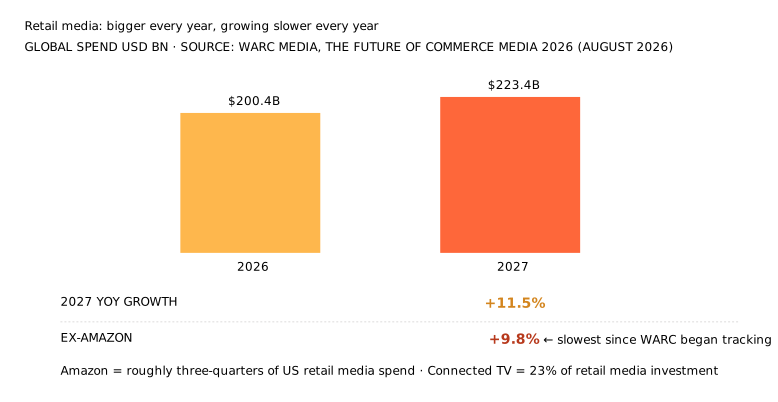
WARC Media forecasts global retail media investment passing $200.4 billion in 2026 and reaching $223.4 billion in 2027 — 15.2% of all worldwide advertising investment. Impressive, until you read the second line: growth of 11.5% in 2027 falls to 9.8% excluding Amazon, the lowest annual rate since WARC began tracking the sector. In 2025, Amazon alone accounted for roughly three-quarters of all US retail media spend, per EMARKETER.

The category is maturing and concentrating at the same time. For everyone outside the top two networks, 2027 is about vertical specialisation and honest attribution rather than inventory scale.

“While retail media excels at converting existing demand, it underperforms on long-term brand building.”

— Alex Brownsell, Head of Content, WARC Media

There is a second, sharper risk that most 2027 planning ignores. Retail media monetises human eyeballs scrolling human-readable pages. WARC’s James McDonald, Director of Data, Intelligence & Forecasting, flagged in the firm’s November 2025 forecast that agentic AI “threatens the high human traffic volumes” that have funded these networks in the first place. If an assistant shortlists three products and the shopper never browses a category page, the sponsored placement on that page was never seen. Retail media and agentic commerce are, structurally, in tension.

What to do in 2027

  • Run GEO or audience holdouts at least twice a year. Closed-loop attribution inside a network is not incrementality.
  • Shift a defined share off-site. Off-site and CTV formats reach the shopper before an agent narrows the field.
  • Renegotiate on ad load. As networks push more units per page, conversion quality degrades. Make placement quality contractual.
  • For SMB retailers: the ROI case for launching your own retail media network in 2027 is thinner than the vendor decks suggest. Check whether you have the traffic to sell before you buy the tech to sell it.

5. Checkout goes wallet-first and agent-readable

Call: Digital wallets pass 60% of global ecommerce transaction value in 2027, while payment-method coverage remains a measurable source of avoidable cart abandonment for SMB merchants.
Watch: Checkout completion rate segmented by payment method offered.
Confidence: High on wallet dominance, Medium on clearing 60% specifically by 2027 — the supporting projection predates the 2025 actuals. Medium on agent-native payment volume.

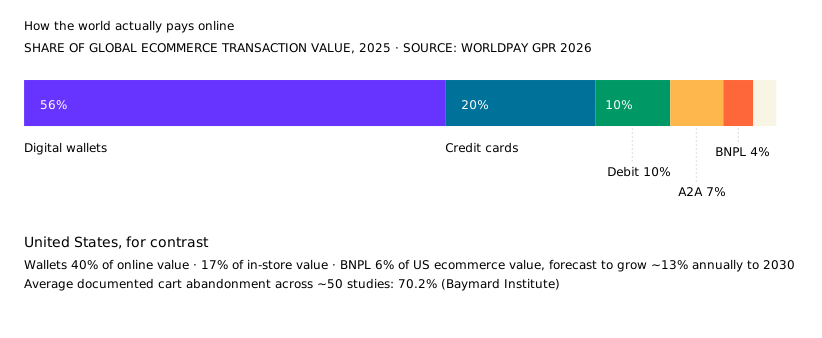
Worldpay’s 2026 Global Payments Report, built on a survey of more than 63,000 consumers across 42 markets, found digital wallets already carrying 56% of global ecommerce transaction value and 33% of in-store spending. Worldpay’s earlier modelling projected wallets reaching 61% of global ecommerce value by 2027 and more than $25 trillion in combined online and point-of-sale transaction value by 2027. Treat that 61% with care: it was published before the 2025 actuals landed, and the current GPR series forecasts to 2030 rather than 2027. Getting from 56% to 61% in two years is a steeper climb than the latest data implies — which is why the call below is rated Medium on timing even though the direction is not in doubt.

The US is a laggard, not a leader, in wallet adoption. If you sell cross-border, the payment mix that works in Chicago will quietly cost you conversions in São Paulo, Amsterdam or Jakarta.

“While retail media excels at converting existing demand, it underperforms on long-term brand building.”

— Alex Brownsell, Head of Content, WARC Media

Two structural shifts sit underneath this. First, account-to-account rails — Pix in Brazil, UPI in India — have made instant bank transfer a first-class ecommerce method in entire markets. Second, agents need a way to pay that is neither a stored card nor a human tapping Face ID. Stripe’s shared payment tokens and Visa’s Trusted Agent Protocol are early answers. Stablecoins remain, per Worldpay’s own framing, a developing story whose clearest near-term use case is cross-border settlement rather than consumer checkout.

What to do in 2027

  • Localise the wallet stack per market, not per platform default. Offering Apple Pay in a Pix market is a conversion tax.
  • Measure approval rates, not just fees. A processor that is 40 basis points cheaper and declines 2% more transactions is more expensive.
  • Treat BNPL as a category decision. It earns its keep on higher-AOV considered purchases and costs you margin on impulse items.
  • Ask your payment provider directly what its roadmap is for delegated or agent-initiated payments. If they cannot answer in 2027, that is data.

6. Landed cost becomes a conversion lever, not a back-office line

Call: Not a forecast — a statutory date. The US de minimis exemption is terminated by law on 1 July 2027. Duty-inclusive pricing at checkout becomes standard practice, and the low-value direct-ship model does not come back.
Watch: International cart abandonment rate at the shipping step.
Confidence: High. This one is written into legislation.

Plain English — what is de minimis?

What it was: For most of the last century, customs authorities waived duty on parcels too cheap to be worth taxing. The US drew that line at $800 per person per day. A shopper in Illinois ordering a $40 phone case direct from a supplier in Shenzhen paid $40 — no duty, almost no paperwork, and the parcel cleared customs on the shipping manifest alone. De minimis is legal shorthand for “too small to bother with”, and the US rule dates to 1938, when chasing a few cents of duty genuinely cost the government more than the few cents were worth.

Who it affects: Anyone whose goods cross a border. That means brands shipping direct from overseas manufacturers, dropshippers, marketplace sellers, and any business importing inventory in lots of small consignments — plus the shoppers buying from them. If you stock domestically and sell domestically you are not directly affected, though your suppliers almost certainly are and their prices will reflect it. Genuine gifts under $100 and goods travellers carry in personally are untouched.

Why it matters: Two things changed, not one. Duty is now owed on that $40 phone case — but the bigger operational hit is that every parcel needs a real customs entry, filed by a qualified party, with real data behind it. Shipping tens of thousands of cheap parcels a month straight from an overseas supplier was a viable business model largely because that paperwork did not exist. It does now. And in the EU and UK, the party legally on the hook for getting it right has shifted from the carrier to the merchant.

The one-line version
The cheapest route from an overseas factory to a customer’s doorstep has been closed — in the US, permanently, from 1 July 2027.

This is the only item on the list with a date already fixed in statute. Section 70531(b) of the One Big Beautiful Bill Act, enacted 4 July 2025, terminates the US de minimis exemption effective 1 July 2027. Everything before that date has been executive action; from that date it is law, and it does not lapse when an administration changes.

The sequence is worth having straight, because it has been widely misreported. Executive Order 14256 suspended duty-free de minimis for imports from China from 2 May 2025. Executive Order 14324 extended the suspension to all countries from 29 August 2025. On 20 February 2026 the Supreme Court decided Learning Resources, Inc. v. Trump, holding that IEEPA does not authorise the President to impose additional tariffs — but the ruling did not address the de minimis suspension. Executive Order 14389 duly ended the IEEPA duties while Executive Order 14388, signed the same day, continued the de minimis suspension. CBP then codified an indefinite suspension in its own regulations by two companion interim final rules on 24 June 2026 — one covering all modes other than the international postal network (91 FR 37789), one covering postal — under its independent statutory authority, explicitly so that the suspension survives regardless of what happens to the executive orders.

0 billion

De minimis shipments processed by US Customs and Border Protection in FY2024 — nearly ten times the 139 million processed in 2015. CBP’s stated reason for ending the exemption is that the volume made the original cost-benefit logic obsolete. CBP, 91 FR 37789.

Europe is moving on the same trajectory. The EU abolished its €150 exemption effective 1 July 2026, replacing it with a flat €3 customs duty per item category, with standard tariffs expected once the Customs Data Hub goes live around 2028 — a response in part to 4.6 billion small packages entering the EU in 2024, after low-value ecommerce imports rose 75% from 2022 to 2023 and nearly doubled again in 2024. The UK plans to remove customs-duty relief for low-value imports of £135 or less by October 2028 at the latest.

Two operational details matter most for 2027. First, under the new EU and UK frameworks the merchant or marketplace becomes the legal customs debtor — the liability moved from the carrier and the customer onto you. Second, in the US the Entry Type 86 test has been suspended and the “release from manifest” route is closed for formerly de minimis goods, leaving Entry Type 11 as the main informal entry method for formerly de minimis non-postal shipments, although formal entry remains an option. That means more data per shipment, filed by a qualified party, on every parcel.

David Meads, Field CTO at Zonos, framed the underlying logic at DELIVER Asia 2026: de minimis existed because collecting duty on tiny parcels cost more than the duty was worth. Digitised customs processing removed that constraint, and governments noticed.

What to do in 2027

  • Show duties and taxes in the cart, before the shipping step. Landed-cost transparency is now a conversion mechanic, not a compliance nicety.
  • Clean your HS classifications. Wrong codes are now expensive on every order, not just on bulk imports.
  • Model forward stocking. For steady-volume SKUs, in-country inventory often beats per-parcel duty once you price the new fees honestly.
  • Re-underwrite your product mix. Sub-$25 imported items may simply no longer work as standalone cross-border SKUs. Bundle or drop them.

7. Returns get engineered instead of policed

Call: Return rates bifurcate through 2027: merchants investing in fit technology, product data and returnless thresholds push the low end down, while policy-only merchants stay flat and lose margin to rising reverse-logistics costs.
Watch: Cost per return and recovery rate — not return rate.
Confidence: Medium. Direction is clear; the size of the gap is not.

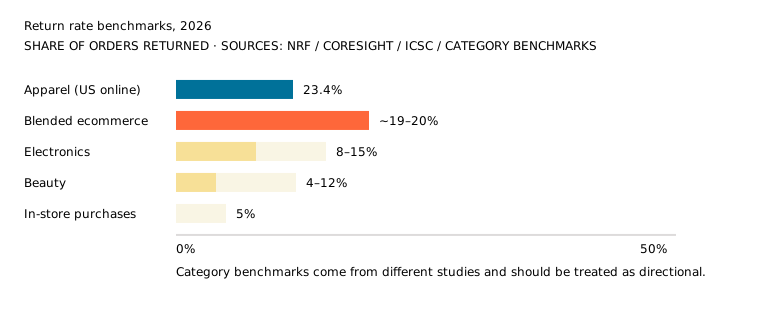
NRF and Happy Returns projected US retail returns at roughly $849.9 billion in 2025 on a 15.8% return rate, with ecommerce projected higher at about 19.3%. In 2024, returns totaled approximately $890 billion on a 16.9% return rate. Those are retailer estimates for the year rather than audited actuals, which matters when you are benchmarking against them. For context, NRF’s projected online return rate of 19.3% provides a more defensible blended ecommerce benchmark than an unsupported DTC estimate.

The blended average is not useful in isolation. Coresight Research found a 23.4% average return rate for US online apparel, while ICSC research found a 5% return rate for in-store purchases. Electronics and beauty benchmarks vary by source. Benchmark against your own category and channel mix, not against a single universal number.

Cost is moving the wrong way, though this is the part of the returns picture with the least published data behind it. There is no authoritative public benchmark for a flat dollar cost per parcel return. Deloitte reports that returns can cost merchants approximately 15–30% of the returned item’s value, depending on the product and process. We are flagging that rather than dressing it up. The practical implication is unchanged: nobody can tell you your cost per return, so you have to calculate it yourself.

Three responses are consolidating into standard practice. Returnless refund thresholds are rising and are increasingly set per SKU tier rather than as one flat rule. AI fit and size prediction is moving from pilot to default in apparel, though we have not found a credible published adoption figure and would treat any specific percentage you are quoted with suspicion. And return fraud — 9% of returns, per NRF, which is the one hard number in this paragraph — is being met with machine-learning policy engines rather than blanket tightening, because blanket tightening costs you good customers along with the bad ones.

What to do in 2027

  • Calculate your true cost per return including support labour and unsellable write-offs, then set a returnless threshold per SKU tier.
  • Fix the top three return reasons at the PDP before touching policy. Fit, expectation mismatch and damage are product-content problems.
  • Move returns to self-service. Every return that starts as an email costs an agent’s time on work a portal should do.
  • Report recovery rate — resale value recovered per dollar returned — alongside return rate in your monthly numbers.

8. B2B quietly becomes the bigger ecommerce prize

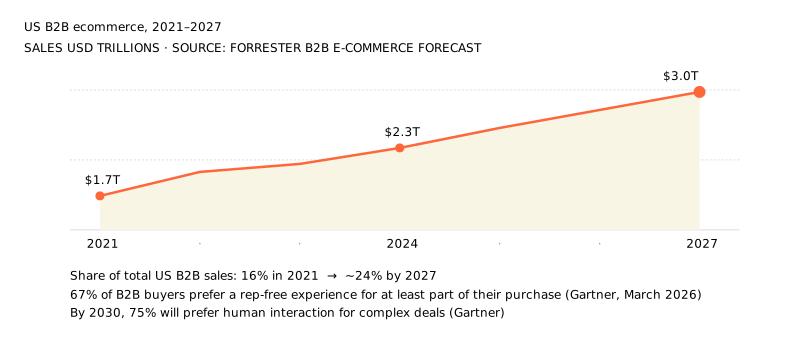
Call: US B2B ecommerce reaches roughly $3 trillion in 2027 — about a quarter of all US B2B sales — and self-service portals move from competitive advantage to table stakes for distributors and manufacturers.
Watch: Share of reorders placed without a sales rep touching them.
Confidence: High on the trajectory. Medium on the exact figure.

Forrester’s forecast has US B2B ecommerce growing from $1.7 trillion in 2021 to approximately $3 trillion by 2027 at a 10.7% compound rate — reaching about 24% of total US B2B sales, up from 16% in 2021. EMARKETER measured B2B ecommerce site sales at $2.297 trillion in 2024, up 10.5% year over year.

B2B is not becoming B2C, but it is adopting B2C’s mechanics. McKinsey’s B2B Pulse research finds buyers now move through roughly ten interaction channels in a single journey, up from about five a decade ago.

The behavioral shift is the real story, though it is usually overstated. Gartner’s finding is that 67% of B2B buyers prefer a rep-free experience for at least part of their purchase — not that two-thirds want sellers out of the process altogether. Read correctly it is a claim about sequencing: most buyers want to complete some stages without a rep, so a mandatory sales touch placed at the wrong stage is friction rather than reassurance. The same research house projects that by 2030, 75% of B2B buyers will prefer human interaction for complex or high-stakes transactions. The 2027 sales motion is bimodal: frictionless and digital for research and reorders, expert and human for the decisions that swing a deal.

Paul Okhrem, Co-Founder and CEO of Elogic Commerce, makes the point that for B2B in 2026–27, operational readiness now matters more than front-end features — clean, API-exposed pricing and catalogue data is the prerequisite for everything from self-service quoting to agentic reordering inside existing contracts.

What to do in 2027

  • Ship the reorder flow first. Repeat purchasing is the highest-volume, lowest-risk portal use case and it frees rep time immediately.
  • Expose contract pricing to the portal. If a logged-in buyer cannot see their price, the portal is a catalogue, not a channel.
  • Publish the specs. B2B buyers research with generative AI now; Content locked behind forms or authentication is largely inaccessible to the crawlers that power AI search and discovery.
  • Keep the human path obvious for high-value and configured orders. Rep-free is a preference, not a rule.

9. Social commerce graduates from brand spend to a revenue line

Call: US social commerce continues expanding in 2027, driven more by spend depth per buyer than buyer growth, with video remaining one of the strongest conversion formats.
Watch: Annual spend per social buyer in your own cohort data.
Confidence: Medium. Forecasts in this category vary by an order of magnitude between vendors.

A note on the numbers in this section
This is the thinnest-sourced trend on the list, and we would rather say so than pretend otherwise. The figures below circulate widely and trace back to EMARKETER social commerce forecasts, but we have only been able to confirm them through secondary compilations rather than the primary releases. Treat them as directional. Every other trend in this article is sourced to a document we have read.

EMARKETER projects US social commerce sales will surpass $100 billion in 2026. The number that matters more is depth rather than headline size: spend per social buyer is forecast to grow substantially faster than the number of buyers, which is a very different operating problem. Growth in basket depth and repeat purchase rewards retention work; growth in buyer count rewards acquisition work. The consensus across forecasters is that 2027 is the former.

Globally the picture is lopsided. Asia-Pacific accounts for the majority of social commerce revenue, and video has emerged as one of the strongest conversion formats — a pattern driven almost entirely by markets where livestream selling has dedicated logistics infrastructure behind it. Specific share figures vary so widely between vendors that we have not quoted one.

Treat the market-size numbers with care
Estimates of the global social-commerce market vary dramatically, from hundreds of billions to several trillion dollars, largely because researchers define social commerce differently. When a vendor cites a headline number at you, ask whether it counts total marketplace GMV, in-app checkout only, or social-influenced purchases. Those are three different businesses.

What to do in 2027

  • Measure the second purchase. Social acquisition is only economic if the cohort repeats; track LTV by acquisition surface, not blended.
  • Build for vertical video first in product photography and creative briefs, then adapt to other placements.
  • Sync catalogue and inventory properly. Out-of-stock items in a social storefront burn trust faster than they do on your site.
  • Test creator partnerships as a channel, not a campaign — with negotiated whitelisting rights so you can put paid behind what works.

10. Composable by surface replaces the big-bang replatform

Call:2027 is a correction year. Incremental, surface-by-surface decoupling becomes the default recommendation, and full-stack composable is reserved for genuinely complex operations with the engineering teams to match.
Watch: Time from decision to live for a new customer-facing surface.
Confidence: Medium. This is a judgement call about industry practice, not a measured trend.

Plain English — Composable, headless, MACH?

What the words mean: Most ecommerce platforms are monolithic: one system handles the catalogue, search, cart, checkout, content and admin together. Think of an all-in-one stereo — it works out of the box and you cannot swap the speakers.

Headless splits that in two. The shopfront customers see is detached from the engine that processes orders, and the two talk over APIs. You can rebuild the shopfront without touching the engine.

Composable goes further and breaks the whole stack into separate specialist services — search from one vendor, checkout from another, product information from a third — assembled like hi-fi separates. MACH is just the industry’s acronym for the principles behind it: Microservices, API-first, Cloud-native, Headless.

Who it affects: Anyone choosing, renewing or outgrowing an ecommerce platform. In practice it becomes a live question when your platform stops being able to do something you need, or cannot reach a place you need to sell. If your store works, your team is small, and you have no developers on staff or on retainer, this is a decision you can reasonably defer — despite what the vendor decks imply.

Why it matters: Composable buys flexibility and bills you in engineering time. Every piece you unbundle is a component you now own the wiring for, plus a vendor relationship, a contract and an upgrade cycle. That trade is worth making when your requirements genuinely exceed what one platform can deliver, and expensive when they do not. The reason it is back on the agenda for 2027 is not fashion — it is that you increasingly need to publish the same catalogue to a website, an app, social storefronts and AI agent endpoints at once.

The one-line version
Composable means assembling your store from separate specialist parts instead of buying one system that does everything. Ask what it lets you do that you cannot do today, and price the wiring honestly.

The adoption statistics look emphatic, and they are routinely misread. The MACH Alliance’s annual survey of 561 senior IT leaders does not find that 61% of organisations expect fully composable architecture — it finds that surveyed organisations predict using MACH for 61% of their technology stack by 2026, which is a materially different claim. Its most recent global research reports that nine in ten organisations that have implemented some MACH technology say it met or exceeded ROI expectations. And the widely circulated figure that 92% of US retail executives have implemented composable traces back to Elastic Path and Retail Dive’s The State of Composable Commerce 2023 — a vendor-sponsored survey of 200 retail executives at companies with $100 million to $3.5 billion in revenue, now three years old. Read all of it carefully: “some form of composable” covers a headless blog attached to a monolithic store, and the MACH figures come from a survey of organisations already invested enough in MACH to answer a MACH survey.

The more useful 2026 data point is the correction. Practitioners who delivered the 2022–24 composable wave now report that organisations going fully composable without the right team structure found integration complexity multiplying engineering backlogs rather than shrinking them. The broader evidence supports a more cautious conclusion: fully composable architectures can increase integration complexity and may not be appropriate for organizations that lack sufficient business complexity or technical maturity.

What is genuinely new is the reason to decouple. Through 2027 you will need to publish the same catalogue to a website, a mobile app, one or more social storefronts, and at least one agent-facing endpoint. That is an argument for an API-addressable commerce core and swappable presentation layers. It is not an argument for replacing your checkout, search, PIM and CMS simultaneously.

What to do in 2027

  • Refuse the big-bang replatform. Migrate surfaces, not the engine. Keep every phase independently reversible.
  • Baseline before you build. Capture field Core Web Vitals and conversion per template, so post-launch claims are provable.
  • Audit your apps and extensions first. Classify each as backend-only, frontend, or dead weight. Uninstall the third category regardless of what you decide next.
  • Treat vendor conversion-lift figures as marketing. Headless does not raise conversion; the performance and merchandising work you do during a headless build does.

11. Measurement rebuilds around incrementality, not clicks

Call: By late 2027, last-click is a diagnostic rather than a decision tool for any merchant above roughly $5M, replaced by a stack of server-side conversion data, media mix modelling and periodic holdout tests.
Watch: Gap between platform-reported ROAS and modelled contribution.
Confidence: Contested. The direction is agreed; the destination is not.

Three pressures are converging. Platform signal keeps narrowing — Meta deprecated its 7-day-view and 28-day-view attribution windows in January 2026, with Meta’s standard attribution defaulting to 7-day click-through, 1-day engage-through and 1-day view-through for applicable conversion campaigns, and GA4 has defaulted to data-driven attribution since retiring first-click, linear, time-decay and position-based as primary models in November 2023. Regulation keeps expanding — by 2026, twenty US states had comprehensive consumer privacy laws in effect, with Indiana, Kentucky and Rhode Island joining on 1 January.

The third pressure is the one nobody has solved. In agent-mediated commerce, the entire discovery and consideration phase happens inside the assistant. The behavioural data stream you receive starts at the add-to-cart moment. You cannot see the comparison, the refinement, or the objection that nearly lost you the sale — and neither can your personalisation engine or your retail media targeting.

Blind above the cart

The measurement problem of 2027 is not attribution modelling. It is that a growing share of the decision now happens on infrastructure you do not own, do not instrument, and cannot query.

The workable 2027 stack is unglamorous: Meta Conversions API and Google Enhanced Conversions to improve conversion measurement by supplementing browser-based tracking with server-side or first-party data signals; zero-party data collected through quizzes, preference centres and post-purchase surveys, which also captures word-of-mouth and offline touchpoints digital attribution misses entirely; media mix modelling on aggregated data for budget allocation; and incrementality tests to settle arguments that models cannot.

What to do in 2027

  • Implement server-side conversion tracking first. It is the highest-leverage single fix — it recovers conversions you are already generating but cannot currently see.
  • Add a post-purchase “how did you hear about us” survey. Low effort, and it can help uncover AI-assisted discovery that traditional referral and click-based attribution misses.
  • Run one holdout test per quarter on your largest channel. Model disagreement is normal; unfalsifiable ROAS is not.
  • Report directional confidence, not false precision. Perfect attribution is not available in 2027 and pretending otherwise makes worse decisions than admitting it.

12. What this actually means if you run a small business

Every number in this article comes from enterprise-scale data. Adobe measured a trillion visits. WARC tracks global ad investment. Forrester models a $3 trillion market. Those figures describe the market you sell into — they are not a budget, a headcount, or a roadmap you can lift.

So here is the translation. If you do somewhere between $250,000 and $5 million online, with no dedicated ecommerce team and a developer who is either part-time or on retainer, the question is not which of these trends are real. They all are. The question is which ones will change anything you actually do in 2027 — and, just as usefully, which ones you are allowed to ignore.

The honest triage

Trend For an SMB Effort
Structured product data for agents ACT Days
Product pages readable by AI ACT 2–4 weeks
Retail media SKIP –
Wallet coverage at checkout ACT Days
Landed cost & duties IF YOU IMPORT 2–3 weeks
Returns economics IF >15% 3–6 weeks
B2B self-service IF YOU SELL TRADE A quarter
Social commerce WATCH Test budget
Composable architecture SKIP –
Server-side tracking ACT Days

Four items are unconditional, three are conditional on your business model, and three you can leave alone. That is a very different article from the one above, and it is the one most small businesses need.

What you are allowed to ignore

Retail media. Unless you are already spending meaningfully on Amazon Ads or Walmart Connect, nothing in trend 03 requires action from you. The conversation about launching your own retail media network is for retailers with traffic to sell. If you are buying traffic rather than selling it, this is somebody else’s problem.

Replatforming. Composable architecture is the most oversold item on the list for businesses your size. If Shopify or WooCommerce currently does what you need, the correct 2027 decision is almost always to stay and spend the money on product data and page speed instead. A replatform is not always the highest-return path. When the underlying problem is conversion friction rather than platform integrations, targeted optimizations may deliver value faster and at a fraction of the cost.

Autonomous checkout. You do not need to integrate a commerce protocol in 2027. What you need is the structured product data those protocols read — and that same data improves your Google Shopping feed and your organic search at the same time. Do the underlying work; skip the integration.

Three worked examples

Scenario A

Two-person apparel brand

Shopify · ~$800k/yr · US plus some international · 28% return rate · agency on retainer

Scenario B

Local specialty retailer

WooCommerce on WordPress · ~$250k online · domestic only · owner-managed · part-time developer
Scenario c

Regional B2B distributor

~$4m · sells to trade · catalogue plus phone-and-email quoting · three sales reps · specs live in PDFs

A realistic year

None of the “act” items above require a platform change, a new vendor category, or a hire. Sequenced across four quarters, a small business year looks roughly like this: fix product data and structured markup; fix checkout payment coverage and, if relevant, landed cost; fix measurement with server-side events and a post-purchase survey; then spend the last quarter on whichever of returns or B2B self-service your model actually exposes you to.

The exact effort will vary by stack and team, but the work can be sequenced across the year in manageable phases, most of it focused on foundations rather than anything labelled as a 2027 trend. The awkward truth of a forecast article is that the correct response to most of it, for most small businesses, is to do unglamorous things properly.

13. One thing compounds. The rest are maintenance.

If you take a single item from all of this, take product data quality. It is doing three jobs at once in 2027: it determines whether agents and assistants can find and correctly describe you, it improves conventional organic search, and accurate, structured product data can reduce avoidable returns by helping customers make better-informed purchase decisions. One piece of work, three payoffs, no platform change required. It is also the least glamorous line item on any roadmap, which is precisely why it stays undone. Everything else on this list is either maintenance you already owed — checkout coverage, landed cost, measurement — or a bet whose size should match your appetite rather than the volume of the surrounding noise. And treat the confidence ratings as an invitation. Two of these ten are rated Medium and one Contested. We will publish a scorecard in early 2028 saying which calls held. Forecasts that never get graded are marketing; forecasts that do are a track record.

Planning your 2027 ecommerce roadmap?

Anala builds and modernises ecommerce for small and mid-sized businesses — catalogue and structured data, checkout and payments, headless surfaces, and the measurement layer underneath. Bring us your current stack and constraints; we will tell you which of these ten actually apply to you and which you can safely ignore.

14. Frequently asked questions

EMARKETER forecasts worldwide retail ecommerce sales of approximately $7.38 trillion in 2027, rising to about $7.89 trillion in 2028 when online reaches roughly 22.5% of total retail spending. For context, 2026 is forecast at $6.88 trillion, or 21.1% of all retail. Growth is steady but decelerating — roughly 7% annually, down from the double-digit rates of the early 2020s. Note that other forecasters using different category definitions publish materially higher figures; Oberlo’s series, for example, puts 2027 at $7.57 trillion. Use one source consistently rather than mixing series.

Agentic commerce is when an autonomous AI agent handles part or all of a purchase — interpreting what the buyer wants, comparing merchants, and in some cases completing checkout — rather than a human browsing a website. In 2026 it is still small: EMARKETER forecasts AI-platform-driven sales at around $20.57 billion, roughly 1.5% of US retail ecommerce — nearly quadruple 2025, but still a rounding error against the channel as a whole. For a small business in 2027, the practical implication is not building agent integrations. It is making sure your product data is structured, complete and machine-readable so that agents can accurately represent and recommend you. That work also improves conventional SEO and reduces returns, so it pays for itself regardless of how fast agentic commerce grows.

It will change its composition more than its volume, at least through 2027. Adobe Analytics, measuring more than a trillion visits to US retail sites, found AI-referred traffic growing 393% year over year in Q1 2026 while converting 42% better than non-AI traffic in March 2026 — a reversal from converting roughly 38% worse a year earlier. The visitors arrive pre-qualified because comparison happened inside the assistant. But absolute volume remains small: Contentsquare reported AI-referred traffic at around 0.2% of total traffic in Q4 2026. Plan for fewer, better-qualified sessions from AI, and continue to defend conventional organic search, which still carries the majority of discovery.

De minimis is a customs rule that let low-value parcels enter a country without duty and with minimal paperwork. The US threshold was $800 per person per day; the EU’s was €150. The name is legal shorthand for “too small to bother with”, and the US version dates to 1938, when collecting duty on a cheap parcel cost the government more than the duty raised. In practice it meant a shopper could order a $40 item direct from an overseas supplier and pay $40, with the parcel clearing customs on the shipping manifest alone. That is no longer the case in the US, EU or UK. Genuine gifts under $100 and personal articles carried by travellers are unaffected.

If you import goods or ship internationally, every parcel now carries duty — and the change is permanent. The US suspended its $800 exemption for imports from China in May 2025 and for all countries from 29 August 2025, and Section 70531(b) of the One Big Beautiful Bill Act terminates the exemption outright by statute on 1 July 2027. US Customs and Border Protection codified an indefinite suspension in its own regulations in June 2026, independent of the executive orders. The EU abolished its €150 exemption on 1 July 2026, replacing it with a flat €3 customs duty per item category, and the UK plans to remove customs-duty relief for low-value imports of £135 or less by October 2028 at the latest. Practical consequences: landed cost per unit rose, low-value imported SKUs may no longer be viable standalone, and under EU and UK frameworks the merchant is now the legal customs debtor. Show duties in the cart rather than surprising customers at delivery.

For most brands, yes — but with tighter measurement and lower expectations of growth. WARC Media forecasts global retail media investment reaching $223.4 billion in 2027, growing 11.5% overall but only 9.8% excluding Amazon, the slowest rate since WARC began tracking the sector. Amazon accounted for roughly three-quarters of US retail media spend in 2025, so “retail media performance” for most advertisers really means Amazon performance plus a long tail. Retail media converts existing demand efficiently and underperforms at brand building. Run holdout tests at least twice yearly rather than relying on network-reported closed-loop attribution, and watch whether rising ad load is degrading the quality of the placements you buy.

Benchmark by category and channel mix rather than against a blended average. The one figure here with a named institutional source is NRF and Happy Returns’ 2025 Retail Returns Landscape, which put the US ecommerce return rate at roughly 19.3% against a 15.8% blended retail rate. Coresight Research found a 23.4% average return rate for US online apparel, while ICSC research found a 5% return rate for in-store purchases. Electronics and beauty benchmarks vary by source. The more actionable metric is cost per return, and there is no authoritative flat-dollar public benchmark for it. Deloitte reports that returns can cost merchants approximately 15–30% of the returned item’s value. Calculate your own, including support labour and unsellable write-offs, and set a returnless threshold per SKU tier from that number.

Most ecommerce platforms are monolithic — one system handles catalogue, search, cart, checkout, content and admin together. Headless splits that in two, detaching the customer-facing shopfront from the order-processing engine so the two communicate over APIs; you can rebuild the front end without touching the back end. Composable goes further, breaking the entire stack into separate specialist services — search from one vendor, checkout from another, product information from a third — assembled through APIs. MACH is the industry acronym for the underlying principles: Microservices, API-first, Cloud-native, Headless. Headless is one architectural change; composable is a whole-stack strategy with correspondingly higher integration cost.

Probably not as a full-stack project. Adoption headlines are misleading — the widely quoted figure that 92% of US retail executives have implemented “some form of composable commerce” comes from a 2023 Elastic Path and Retail Dive survey of 200 executives, and includes very light implementations. Practitioners who delivered the 2022–24 composable wave report that organisations going fully composable without mature engineering teams found integration complexity multiplied their backlogs. The defensible 2027 approach is incremental: keep the commerce engine, decouple one surface at a time, and keep every phase independently reversible. The real driver for decoupling now is distribution — you need to publish the same catalogue to web, app, social storefronts and agent endpoints — not front-end fashion.

Accept that user-level attribution will keep degrading and build a portfolio of imperfect methods instead of chasing one perfect one. Start with server-side conversion sending — Meta’s Conversions API and Google’s Enhanced Conversions — which recovers events that browser pixels miss; this is the highest-leverage single fix. Add a post-purchase survey asking how customers found you, which can help uncover AI-assisted discovery and word-of-mouth that traditional referral and click-based attribution misses. Use media mix modelling on aggregated data for budget allocation, since it needs no cookies or device IDs. Then run quarterly incrementality holdouts on your largest channel to settle disputes the models cannot. Report directional confidence rather than false precision.

Product data quality, for three compounding reasons. Structured, complete, accurate product data determines whether AI assistants and shopping agents can find and correctly describe your products; it improves conventional organic search at the same time; and accurate sizing, materials and compatibility information can reduce avoidable returns, which are one of the fastest-rising ecommerce cost lines. It requires no replatform, no new vendor, and no bet on how fast agentic commerce grows. After that, in order: landed-cost transparency at checkout if you sell cross-border, wallet coverage per market, and server-side conversion tracking.

15. Sources

All figures current as of August 2026. Forecast figures are the publisher’s, not ours; where forecasters disagree materially we have said so in the text.

  1. EMARKETER, worldwide retail ecommerce forecast (February 2025 series), reported via Shopify — shopify.com/blog/global-ecommerce-sales
  2. Oberlo, Global Ecommerce Sales Growth 2022–2028 — oberlo.com/statistics/global-ecommerce-sales-growth
  3. ResearchAndMarkets, AI Shopping Agents and Agentic Commerce 2026: Adoption Trends and Execution Limits (May and August 2026 releases)
  4. commercetools, The agentic commerce radar: Spring 2026 update, 22 April 2026, and Agentic Commerce Stats: Enterprise Guide, 2026 — commercetools.com
  5. Forrester, The State of Agentic Commerce, Q2 2026 — forrester.com
  6. Adobe Digital Insights, Q2 2026 AI Traffic Report (published 16 April 2026, covering calendar Q1 2026) — business.adobe.com
  7. Digital Commerce 360, “Adobe: AI-referred traffic to retail sites doubles in a year”, 17 June 2026 — digitalcommerce360.com
  8. Contentsquare digital experience benchmark, 2025 (99 billion sessions), reported via industry analysis
  9. WARC Media, The Future of Commerce Media 2026 — reported via MarketingReport and bestmediainfo, August 2026
  10. WARC Media retail media forecast, November 2025 — retailmediaage.co.uk
  11. EMARKETER, FAQ on agentic commerce / AI Commerce 2026, December 2025 forecast (AI platforms at $20.57 billion, 1.5% of US retail ecommerce in 2026) — emarketer.com
  12. EMARKETER, US retail media ad spending share by platform, 2025–26 estimates — emarketer.com
  13. Worldpay (now part of Global Payments), Global Payments Report 2026, 63,000+ consumers across 42 markets — worldpay.com
  14. Worldpay, Global Payments Report 2024 digital wallet projections to 2027 — corporate.worldpay.com
  15. US Customs and Border Protection, “Indefinite Suspension of the De Minimis Exemption for Merchandise Arriving Through All Modes Other Than the International Postal Network”, interim final rule, 91 FR 37789, 24 June 2026 — federalregister.gov
  16. One Big Beautiful Bill Act, Public Law 119-21, Section 70531(b) — terminates the de minimis exemption effective 1 July 2027
  17. Learning Resources, Inc. v. Trump, 607 U.S. __ (2026), decided 20 February 2026; Executive Orders 14388 and 14389 of the same date
  18. Euromonitor International, “The definitive end of the de minimis tariff exemption” — euromonitor.com
  19. ShipperHQ, “De Minimis Is Ending in the EU”, June 2026 — shipperhq.com
  20. DELIVER Asia 2026, session with David Meads, Field CTO, Zonos — deliver.events
  21. National Retail Federation and Happy Returns, 2025 Retail Returns Landscape, October 2025
  22. Forrester, 2022 B2B E-Commerce Forecast, US — forrester.com
  23. Elogic Commerce, B2B ecommerce trends and composable commerce analysis, 2026 — elogic.co
  24. Gartner, B2B buyer survey (646 buyers, fielded August–September 2025, published 9 March 2026): 67% prefer a rep-free experience for at least part of their purchase. An earlier Gartner survey of 632 buyers, fielded August–September 2024, found 61% preferred an overall rep-free experience — gartner.com
  25. Gartner, “Gartner Says By 2030 that 75% of B2B Buyers Will Prefer Sales Experiences that Prioritize Human Interaction Over AI”, press release, 25 August 2025 — gartner.com
  26. McKinsey & Company, B2B Pulse — buyer channel counts across the purchase journey
  27. Baymard Institute, cart abandonment meta-analysis (70.2% average across ~50 studies) — baymard.com
  28. MACH Alliance, Global Annual Research Report (fifth annual survey, 561 senior IT leaders) — for the 61%-of-technology-stack projection and the ROI finding — machalliance.org
  29. Elastic Path and Retail Dive (Industry Dive studioID), The State of Composable Commerce 2023: Are You Unlocking The Opportunities? — survey of 200 retail executives; source of the 92% figure — elasticpath.com
  30. Supermetrics, Facebook Ads: New historical limitations, attribution window and metric removals — Meta 7-day and 28-day view-through attribution window deprecation effective 12 January 2026 — docs.supermetrics.com
  31. Jon Loomer, Meta Ads Attribution 2026 — current Meta attribution-window wording including engage-through — jonloomer.com
  32. Google Analytics Help, Get started with attribution — retirement of first-click, linear, time-decay and position-based attribution models in November 2023 — support.google.com
  33. IAPP, U.S. State Privacy Legislation Tracker — comprehensive consumer privacy laws in effect by 2026 — iapp.org
  34. Indiana Attorney General, Indiana Consumer Data Protection Act guidance — in.gov
  35. Kentucky Attorney General, Kentucky Consumer Data Protection Act — ag.ky.gov
  36. Rhode Island General Assembly, Data Transparency and Privacy Protection Act — rilegislature.gov
  37. Google Ads Help, Enhanced Conversions — conversion measurement using first-party signals — support.google.com
  38. Stripe, Testing the conversion impact of 50+ global payment methods — measured conversion impact of offering relevant payment methods — stripe.com
  39. 1WorldSync, Product Content Benchmark — relationship between inaccurate product information and avoidable returns — 1worldsync.com
  40. ECR Retail Loss, Buy Online Return in Store — returns as a growing retail cost pressure — ecrloss.com
  41. Coresight Research, Shifting the Size and Fit Paradigm — U.S. online apparel return-rate research — s3.alvanon.com
  42. ICSC, consumer returns research — in-store versus online return rates — icsc.com
  43. Deloitte, retail industry outlook — returns can cost approximately 15–30% of the returned item’s value — deloitte.com
  44. Shopify, Returnless Refunds — growing use of returnless refunds — shopify.com
  45. Shopify, composable commerce guidance — integration complexity and organizational/technical maturity considerations — shopify.com
  46. EMARKETER, U.S. social commerce forecast — 2026 sales above $100 billion — emarketer.com
  47. EMARKETER, social commerce FAQ — buyer-spend growth versus buyer growth — emarketer.com
  48. Grand View Research, social commerce market — Asia-Pacific share of global social-commerce revenue — grandviewresearch.com
  49. European Commission, temporary €3 customs duty guidance for low-value imports — ec.europa.eu
  50. European Commission, low-value ecommerce import facts and figures — ec.europa.eu
  51. UK Government, Reforming the customs treatment of low-value imports into the UK — removal of low-value customs-duty relief by October 2028 at the latest — gov.uk
  52. U.S. Supreme Court, Learning Resources, Inc. v. Trump, decided 20 February 2026 — supremecourt.gov
  53. White House, Executive Order 14388, continuing the suspension of duty-free de minimis treatment for all countries — whitehouse.gov
  54. Federal Register, Executive Order 14389 — termination of relevant IEEPA duties — federalregister.gov
  55. Google Search Central, technical requirements and indexable file types — public accessibility is required for crawling, and PDFs are indexable when accessible — developers.google.com
  56. OpenAI Help Center, Publishers and Developers FAQ — public content can appear in ChatGPT Search when OAI-SearchBot is allowed access — help.openai.com

Your Best Customers Never Filled Out Your Contact Form

Every month, your website tells you how many leads you generated.

What it never tells you is how many qualified buyers almost became customers.

They visited your website. They explored your solutions. They compared you to competitors. Then they quietly left without filling out a contact form, scheduling a demo, or making a phone call.

The surprising part isn’t that they left. It’s that most businesses never ask why.

HubSpot’s 2024 B2B Buyer research found that 75% of buyers prefer to gather information on products independently, and 57% purchased a solution in the past year without ever meeting the vendor’s sales team. In other words, today’s buyers expect to educate themselves long before they’re ready to have a sales conversation. 

That means your website has a bigger job than simply generating leads. It has to answer questions, build trust, reduce uncertainty, and help buyers feel confident enough to take the next step.

When it doesn’t, visitors rarely tell you what went wrong. They simply move on.

Imagine you’re the marketing director for a manufacturing company searching for a new technology partner. You land on a website hoping to answer a few practical questions.

  • Have they worked with companies like ours?
  • How long does implementation take?
  • Will their solution integrate with our existing systems?
  • What makes them different from the other vendors we’re evaluating?

Instead, you find broad marketing claims, generic stock photography, and a prominent “Request a Demo” button. None of your questions are answered, and you’re not ready to talk to sales. So you leave and continue your search.

From the company’s perspective, nothing unusual happened. Google Analytics records another website session. The marketing team sees another visitor. No alerts go off. No reports identify a missed opportunity.

The reality is very different.

That visitor wasn’t just another session. They may have been one of your best potential customers.

The good news is that many of these lost opportunities have nothing to do with driving more traffic. They happen because buyers don’t have enough confidence to move forward.

The businesses that consistently convert more qualified buyers aren’t necessarily attracting more visitors. They’re creating websites that answer the right questions at the right time, helping buyers make informed decisions with confidence.

That’s exactly what we’ll explore throughout this article.

We Measure What We Can See

Marketing has never had more data.

We know how many people visited our website. We know which channels drove the most traffic, which campaigns generated the most leads, and what our conversion rate was last month. Dashboards make it easy to measure what happened.

What they don’t measure is what almost happened.

In fact, having more data doesn’t always lead to better decisions. When businesses focus on collecting metrics instead of uncovering meaningful insights, it’s easy to overlook the opportunities hiding behind the numbers. We explored this idea further in Why More Data Doesn’t Lead to Better Decisions, where we discuss why context is often more valuable than another dashboard.

Imagine two companies that each receive 2,000 website visitors in a month and generate 40 leads. On paper, their performance looks identical.

The difference is what happened to everyone else.

Company A attracted mostly casual visitors who were never serious buyers. Forty leads might represent an excellent outcome.

Company B attracted dozens of highly qualified prospects who spent several minutes exploring the website before leaving without taking the next step. Those same 40 leads may represent a significant missed opportunity.

Looking at website analytics alone, you would never know the difference.

That’s because the most valuable insights often come from the people who didn’t convert.

They clicked through your service pages. They read your case studies. They compared your company to competitors. Somewhere along the way, they decided they didn’t have enough information to move forward.

Your analytics platform records a session.

Your CRM records nothing.

Your sales team never knows they existed.

A Practical Exercise

Think about the last customer your team won.

What questions did they ask before they signed the contract?

Now visit your website and see if those answers are easy to find.

Could a first-time visitor quickly discover:

  • Who you help?
  • What makes your solution different?
  • How your process works?
  • What results you’ve achieved for similar customers?
  • What happens after they reach out?

If those answers require a conversation with sales, your website may be asking buyers to make a decision before they’ve built enough confidence to do so.

The goal isn’t to answer every possible question on every page. It’s to anticipate the questions that matter most and answer them before uncertainty sends buyers looking elsewhere.

Why Qualified Buyers Quietly Leave

It’s easy to assume that people leave your website because they aren’t interested.

In many cases, the opposite is true.

Qualified buyers visit your website because they believe you might have the solution they’re looking for. They spend time exploring your content because they’re actively evaluating whether your business is the right fit. Then, somewhere along the way, uncertainty creeps in.

That uncertainty may only last a few seconds, but it’s often enough to send a buyer back to Google or on to a competitor.

Here are five of the most common reasons it happens.

1. They Can’t Find the Answers They’re Looking For

Every visitor arrives with questions. The faster your website answers them, the easier it becomes for buyers to move forward.

Unfortunately, many websites focus on describing the company instead of helping customers make a decision.

One of the quickest ways to lose a qualified buyer is to make them work for basic information.

Think about the last time you researched a significant business purchase. You probably weren’t looking for marketing language. You wanted answers to practical questions like implementation timelines, integrations, pricing, or industry experience.

Instead, they find a homepage filled with phrases like “innovative solutions” and “industry-leading expertise.“

None of those statements answer the questions they came to ask.

Rather than contacting your team, they leave to find a company that does.

Practical Application

Choose one of your highest-traffic service pages and read it from the perspective of a first-time visitor.

Highlight every sentence that answers a customer’s question.

Then highlight every sentence that talks about your company.

If your content spends more time talking about yourself than helping buyers make a decision, you’ve identified an opportunity to improve.

2. They’re Not Ready for Your Call to Action

Many websites assume every visitor is ready to schedule a demo or request a consultation.

Most aren’t.

Some buyers are still comparing vendors. Others need pricing information, implementation details, or proof that your solution works before they’re comfortable speaking with sales.

When the only next step is “Contact Us,” visitors who aren’t ready often choose no action at all.

Think about someone shopping for a new CRM platform. They aren’t avoiding your sales team because they lack interest. They’re trying to understand how implementation works, how long it takes, and whether the investment makes sense for their organization.

If your website can’t answer those questions independently, buyers are forced to keep researching elsewhere.

Practical Application

Review your top five landing pages.

Does each page offer an appropriate next step for visitors who are:

  • Just beginning their research
  • Comparing different providers
  • Ready to make a purchasing decision

A website should support buyers at every stage of their journey, not just the final one.

3. They Don’t See Themselves in Your Story

Trust begins when buyers recognize that you understand their business.

Imagine you’re the operations director for a regional manufacturer. Your challenges revolve around complex workflows, multiple locations, and integrating new technology with legacy systems.

You visit a company’s website and every customer story features startups, software companies, or agencies.

Even if that company could solve your problem, you begin to wonder whether you’re the right fit.

That uncertainty is often enough to stop the buying process before it starts.

Practical Application

Ask someone outside your organization to spend five minutes on your website.

Then ask them these questions:

  • Who does this company serve?
  • What problems do they solve?
  • Which industries seem to be their strongest fit?

If the answers don’t match your ideal customers, your messaging may be attracting the wrong audience or failing to reassure the right one.

4. They Become Overwhelmed

Sometimes the problem isn’t missing information.

It’s too much information.

A navigation menu with twenty options. Pages filled with industry jargon. Multiple competing calls to action. Endless paragraphs that never answer the question a visitor actually came to ask.

Instead of making buyers feel informed, the experience makes them work harder.

The easier your website is to understand, the easier it becomes to trust.

Practical Application

Watch someone who has never visited your website try to complete a simple task, such as finding your pricing, locating a case study, or learning how your process works.

Don’t explain anything.

Simply observe where they hesitate.

Those moments often reveal opportunities that analytics alone can’t.

5. They Don’t have Enough Confidence Yet

This is the reason that ties everything together.

Buyers rarely leave because they have too much information.

They leave because they don’t have the information they need to make a confident decision.

Confidence comes from answering questions before they’re asked. It comes from demonstrating expertise instead of simply claiming it. It comes from showing buyers that you’ve solved similar problems before and can guide them through what comes next.

The websites that consistently generate more qualified leads don’t necessarily have the most traffic or the flashiest design.

They make it easier for buyers to believe they’re making the right decision.

Practical Application

Ask yourself one simple question:

If I knew nothing about my company, would this website give me enough confidence to contact us?

If the answer is anything less than an immediate “yes,” you’ve uncovered an opportunity to improve the buyer experience before investing another dollar in driving more traffic.

Answer the Questions Buyers Are Already Asking

We’ve explored why qualified buyers leave websites without taking the next step. The reasons vary from business to business, but they almost always have one thing in common.

Buyers don’t leave because they have too much information.

They leave because they don’t have the information they need to make a confident decision.

The good news is that building confidence doesn’t require guessing what buyers want. It starts by answering a handful of fundamental questions every visitor is trying to answer before they contact your business.

Think of the following questions as a framework for evaluating every important page on your website. If buyers can’t answer them quickly and confidently, they’re more likely to continue searching elsewhere.

1. What do you actually do?

This sounds like an easy question to answer, but it’s one of the most common places businesses create confusion. Companies often describe themselves using industry jargon, internal terminology, or broad marketing language that means very little to someone visiting the website for the first time.

Instead of making visitors interpret what you do, tell them in plain language how you help and the problem you solve.

Practical Application

Ask someone outside your organization to spend 30 seconds on your homepage. Then ask them to explain what your company does without looking back at the screen.

If they struggle to explain it clearly, your messaging probably needs more clarity.

2. Who do you help?

Your website shouldn’t feel like it was written for everyone.

Buyers are looking for signals that you’ve worked with organizations like theirs and understand the challenges they’re facing. That doesn’t necessarily mean creating separate pages for every industry. Sometimes it’s as simple as featuring relevant customer stories, highlighting common business challenges, or showing examples that resonate with your ideal audience.

People trust businesses that understand their world.

Practical Application

Review your homepage and your top three service pages.

Would your ideal customer immediately recognize themselves in your messaging, or could your website describe almost any business in your industry?

3. Why should I trust you?

Trust isn’t built by saying you’re experienced. It’s built by showing it.

Case studies. Customer testimonials. Certifications. Awards. Recognizable clients. Measurable results.

Every piece of proof reduces uncertainty and gives buyers another reason to believe they’re making the right decision.

Consider these two statements:

“We’re an industry leader delivering innovative solutions.“

“We helped a regional healthcare provider reduce onboarding time by 35% while improving patient satisfaction scores.“

Which company would you trust more?

Buyers don’t trust claims. They trust evidence.

Practical Application

Choose one of your service pages and count how many claims you make versus how many pieces of evidence you provide.

If you’re making more promises than proving them, look for opportunities to strengthen your credibility.

4. What happens next?

For many buyers, uncertainty isn’t about your solution. It’s about your process.

What happens after they submit the contact form?

Will someone call them immediately?

Will they receive pricing?

Is the first meeting a consultation or a sales presentation?

The easier you make the next step feel, the easier it becomes for buyers to take it.

Practical Application

Read the copy surrounding your primary call to action.

Does it explain what visitors can expect after they click?

A simple sentence outlining the next step can remove hesitation and increase confidence.

5. Why should I choose you?

Buyers are always comparing options, even if they never tell you.

They’re evaluating your experience, your process, your expertise, and the overall confidence they feel while interacting with your website.

Your differentiators shouldn’t be hidden three pages deep or buried in a paragraph of marketing copy. They should be easy to discover and supported with examples that make your value clear.

Practical Application

Ask someone unfamiliar with your business to spend five minutes on your website.

When they’re finished, ask one question:

“What makes this company different from its competitors?“

If they can’t answer, your differentiation may not be as obvious as you think.

6. Why should I take the next step today?

Not every visitor is ready to become a customer.

That’s okay.

Your website shouldn’t force every buyer into the same journey. It should offer meaningful next steps that match where they are in the decision-making process.

Someone beginning their research might want to read a case study or explore your resources. Someone further along may be ready to schedule a consultation or request a proposal.

The goal isn’t to push every visitor toward the same action. It’s to make the next step feel like the right one.

Practical Application

Look at your website as a whole.

Do you provide opportunities for buyers who are:

  • Just beginning their research?
  • Comparing potential solutions?
  • Ready to make a decision?

If every page leads to the same call to action, consider whether you’re supporting the entire buying journey or only the final stage.

When buyers can’t answer these six questions, uncertainty grows. When uncertainty grows, people delay decisions or continue searching for alternatives.

The good news is that you don’t have to guess what buyers want to know.

In fact, the answers are probably already inside your organization.

Turn Sales Conversations Into Better Website Content

One of the biggest mistakes businesses make is treating website content as a marketing exercise.

In reality, some of your most valuable website content is created every day by your sales team.

Think about the conversations they have with prospective customers.

They answer questions.

They explain your process.

They address objections.

They clarify misconceptions.

They build trust.

In many cases, they’re providing information that could have answered a buyer’s questions before the conversation ever began.

Imagine a salesperson who finds themselves explaining the same implementation process three times a week. Or answering the same pricing question on every discovery call. Or reassuring prospects that your solution integrates with the systems they already use.

Those aren’t just sales conversations.

They’re signals.

Every repeated question is an opportunity to improve your website and help future buyers find the answers they’re looking for without waiting for a meeting.

Turn Sales Conversations Into Website Content

Instead of asking your marketing team what they should write next, ask your sales team what they explained this week.

Some of the best website content comes directly from the questions buyers ask every day.

For example:

If Sales Frequently Explains…Your Website Could Include…
How your implementation process worksA page that walks buyers through each step of onboarding
How long projects typically takeA timeline or “What to Expect” section
Whether you’ve worked with similar companiesIndustry pages, customer stories, or case studies
Why your approach is differentA comparison page or a section explaining your methodology
Common pricing questionsA pricing FAQ or a guide explaining the factors that influence cost

The goal isn’t to eliminate conversations with sales.

The goal is to help buyers arrive at those conversations feeling informed instead of uncertain.

When buyers spend less time asking basic questions, sales teams can spend more time discussing business challenges, goals, and solutions.

Practical Exercise

Schedule a 30-minute meeting with your sales team.

Ask each person to write down the five questions they answered most often during the past month.

Don’t overthink it.

Don’t ask them to brainstorm.

Ask them what buyers are already asking.

When everyone finishes, group similar questions together.

You’ll probably notice patterns.

Those patterns can become:

  • New website copy
  • Frequently asked questions
  • Blog articles
  • Case studies
  • Videos
  • Resource guides
  • Landing pages
  • Email nurture content

Instead of guessing what buyers want to know, you’ll be building content around real conversations with real prospects.

That’s one of the fastest ways to create a website that builds confidence before a buyer ever contacts your team.

Improving your website doesn’t always require a redesign.

Sometimes it starts with something much simpler.

Listen more closely to the questions your buyers are already asking, then make sure your website answers them before your competitors do.

Build Buyer Confidence Before You Build Traffic

Every month, qualified buyers visit your website looking for answers. Some will become customers. Others will quietly leave without ever contacting your team.

The difference often isn’t your product, your pricing, or even your competition. More often, it’s whether your website answered the questions that mattered most and gave buyers the confidence to take the next step.

Throughout this article, we’ve explored why qualified buyers leave, the warning signs to watch for, and the questions every website should answer. None of these ideas require a complete redesign. More often, they require making your website more useful, more transparent, and more aligned with the way people actually make buying decisions.

Every unanswered question creates doubt.

Every unanswered doubt creates an opportunity for a competitor.

The businesses that consistently convert more qualified buyers aren’t necessarily attracting more traffic. They’re making better use of the traffic they already have by creating a website that educates, builds trust, and helps buyers make informed decisions.

Before you invest another dollar in SEO, paid advertising, or a website redesign, ask yourself three simple questions:

  • What questions are our buyers asking that our website doesn’t answer?
  • Where are qualified buyers most likely to lose confidence?
  • What’s one improvement we could make this month that would help buyers make a more informed decision?

You don’t have to solve everything at once.

Sometimes one clear answer, one stronger customer story, or one better explanation of your process is enough to turn an interested visitor into your next customer.

What If Your Website Isn't Missing Traffic?

What if it’s missing confidence?

If this article made you wonder whether qualified buyers are leaving your website with unanswered questions, you’re not alone. It’s one of the most common challenges we see, and one that’s often invisible until someone looks at the buying experience from the customer’s perspective.

A conversation with Anala isn’t about jumping straight to a redesign or a new marketing campaign. It’s about understanding how your website supports the way buyers evaluate, compare, and ultimately choose your business.

If you’re ready to explore where buyers may be losing confidence and what you can do about it, we’d love to help.

Schedule a free consultation to explore where buyers may be losing confidence and how your website can do a better job turning qualified visitors into customers.